
UPDATED: Ricoh’s Response to Basic Authentication Phase-Out in Microsoft Exchange Online SMTP Authentication
Thank you for using Ricoh products and services.
Microsoft has announced that basic authentication for sending email using the SMTP protocol in Microsoft Exchange Online will be discontinued after March 2026*. Following this change, OAuth 2.0 authentication will be required to send emails using SMTP authentication through Exchange Online.
*On 11 June 2025, Microsoft updated the timeline for the planned phase-out, which was previously scheduled for September 2025.
We would like to share information about the Ricoh product functions affected by this change and our support schedule for OAuth 2.0.
1. Affected Functions
Once basic authentication is phased out, the following features will be impacted, resulting in errors when attempting to send emails:
- Scan Function (Send to Email)
- Internet Fax (Send)
- Fax-to-Email Forwarding
- On-demand Email Notification
(Function to check device status via email) - Auto Email Notification
(Function to send error reports to the administrator’s email) - Sending error notifications when using Mail to Print
2. Ricoh’s Response
To address this change, firmware updates supporting OAuth 2.0 authentication will be released starting July 2025. Release schedules will vary by product model. Please refer to section 3. OAuth 2.0 Compatible Models and Support Schedule for specific details.
For devices that do not support automatic firmware updates—or where automatic updates have not been enabled—the firmware needs to be manually updated using the RICOH Firmware Update Tool. Following the update, authentication settings must be configured via Web Image Monitor.
For detailed setup instructions, please consult the guide below:
Guide to Set Up OAuth2.0 Authentication for Microsoft Exchange Online Email
Once support for basic authentication for SMTP in Exchange Online has ended, and until firmware supporting OAuth 2.0 becomes available for your product, you may need to temporarily switch to alternative communication methods or use an email service other than Exchange Online.
3. OAuth2.0 Authentication Compatible Models and Support Schedule
The list of supported products and firmware update availability schedule have been updated as of July 24, 2025.
| Category | Product/Model | Firmware update availability schedule (using RICOH Firmware Update Tool) |
|---|---|---|
| Colour MFP | IM C6510/C8010 | Mid-September |
| IM C6500/C8000 | Early September | |
| IM C7010 | Early August | |
| IM C3010SD/C3510SD/C4510SD/C6010SD | Mid-August | |
| IM C2010/C2510/C2510J/C3010/C3510/ C3519J/C4510/C5510/C6010 | Early August | |
| IM C2000/C2500/C2509J/C3000/C3500/ C3509J/C4500/C5500/C6000 | Mid-August | |
| IM C2501CE/C3501CE/C5501CE | Early September | |
| IM C530F/C530FB | Mid-September | |
| IM C401F/C401SRF | Early September | |
| IM C300/C300F/C400F/C400SRF/C400SRFG | Early September | |
| IM C320F | TBD | |
| IM CW2200 | Late September | |
| M C2501 | Late October | |
| MP C6503/C8003 | Early July | |
| MP C2004/C2094J/C2504/C2594J/C3004/C3504/C4504/ C5504/C6004 | Late August | |
MP C2004ex/C2094exJ/C2504ex/C3004ex/C3504ex/ | Late August | |
| MP C4503/C5503/C6003* without Smart Operation Panel | Late August | |
| MP C4503/C5503/C6003* with Smart Operation Panel | Late August | |
| MP C3003/C3503* without Smart Operation Panel | Mid-August | |
| MP C3003/C3503* with Smart Operation Panel | Mid-August | |
| MP C2003/C2003Z/C2503/C2503Z* without Smart Operation Panel | Early September | |
| MP C2003/C2003Z/C2503/C2503Z* with Smart Operation Panel | Early September | |
| MP C501 | Late October | |
| MP C401/C401SR * with Smart Operation Panel | Early October | |
| MP C401/C401SR * without Smart Operation Panel | Mid-October | |
| MP C307/C407 | Mid-August | |
| MP C306 | Early September | |
| MP CW2201 | Late October | |
| SP C360SFNw/C361SFNw | Early September | |
| IP CW2200 | Early November | |
| Monochrome MFP | IM 7000/8000/9000 | Early September |
| IM 2500/2509J/3000/3009J/3500/ 3509J/4000/5000/6000 | Mid-August | |
| IM 2702 | Early September | |
| IM 550F/600F/600SRF/600SRFG | Late August | |
| IM 370/460/460FTL | TBD | |
| IM 350/IM 430 | Mid-August | |
| MP 6503/7503/9003 | Early September | |
| MP 2555/3055/3555/4055/5055/6055 | Mid-August | |
| MP 2554/3054/3554/4054/5054/6054* without Smart Operation Panel | Mid-September | |
| MP 2554/3054/3554/4054/5054/6054* with Smart Operation Panel | Early October | |
| MP 2001/2501 | Late October | |
| MP 501/601 | Early September | |
| MP 402SPF | Mid-August | |
| MP 305+SP/305+SPF | Mid-September | |
| Aficio MP6002/7502/9002 | Early October | |
| Aficio MP 301 | Early-October | |
| MP W7100/8140 | Late October | |
| MP W6700SP | Late October | |
| Colour Printer | IP C8500 | Mid-September |
| P C600 | Mid-November | |
| P C375 | Early September | |
| SP C840DN/C842DN | Mid-November | |
| SP C360DNw | Mid-November | |
| SP C340DN/C342DN | Early November | |
| SP C333DN | Mid-November | |
| Monochrome Printer | SP 8400DN | Late October |
| SP 5300/5310 | Mid-November | |
| P 800/801 | Early November | |
| P 501/502 | Late October | |
| Production Cutsheet | Pro C9200/C9210 | Early November |
| Pro 8400S/8410S/8420S | Early September | |
| Pro 8410/8420 | Late September | |
| Pro 8300S/8310S/8320S | Mid-August | |
| Pro 8310/8320 | Mid-November | |
| Pro C7200S/C7210S/C7200SX/C7210SX | Mid-September | |
| Pro C7200/C7210/C7200X/C7210X | Mid-November | |
| Pro C5400S/C5410S | Mid-September | |
| Pro C5400SL | Mid-September | |
| Pro C5300S/C5310S | Early September | |
| Pro C5300SL | Early September | |
| Pro C5200S/C5210S | Early August |
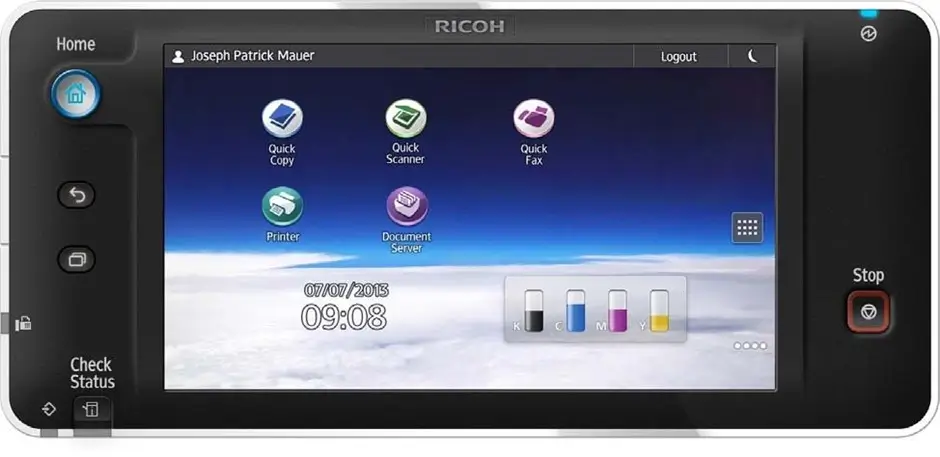 *Smart Operation Panel
4. Important Notices
- Limited Support Scope
Products that are not listed in 3. OAuth 2.0 Authentication Compatible Models and Support Schedule will not be supported. - Authentication Requirements
To enable email sending using OAuth 2.0, users must install the appropriate firmware and configure settings via Web Image Monitor. - Administrator Email Requirement
When using OAuth 2.0 authentication, an administrator email address must be registered. This email will act as the sender for scanner functions, error notifications, and as the "From" address for SMTP authentication.
5. Related Information
For guidance on sending emails from printers and similar devices using Microsoft 365—including alternative methods that do not require SMTP authentication—please refer to the following Microsoft article:
To read Microsoft’s announcement on ending support for basic authentication for SMTP authentication in Exchange Online, please visit the following link:
6. Contact Information
Please contact your local Ricoh representative or dealer if you have any queries.
We appreciate your understanding and cooperation as we work to ensure continued functionality and compliance across Ricoh devices.
* Company and product names are trademarks or registered trademarks of their respective companies.
News
Keep up to date
- 19Sep
Ricoh named in TIME World's Best Companies of 2025 for employee engagement, growth and sustainability
- 19Aug
Ricoh Asia Pacific and Microsoft Collaborate to Empower a Future-Ready Workforce Through AI
- 30Jul
Ricoh selected for inclusion in six ESG indices for Japanese equities adopted by the GPIF
- 24Jul
UPDATED: Ricoh’s Response to Basic Authentication Phase-Out in Microsoft Exchange Online SMTP Authentication